

Lumin PDF Highlights E-Signature Tools to Help US Sales Teams Accelerate Agreement Signing
The right esign PDF tool closes that gap. It lets a rep send a contract in a few clicks, track who has signed, and send automatic reminders without chasing anyone by hand. Lumin is one option that covers this workflow, with signing that works from a desktop, tablet, or phone and integrations for Salesforce and HubSpot.
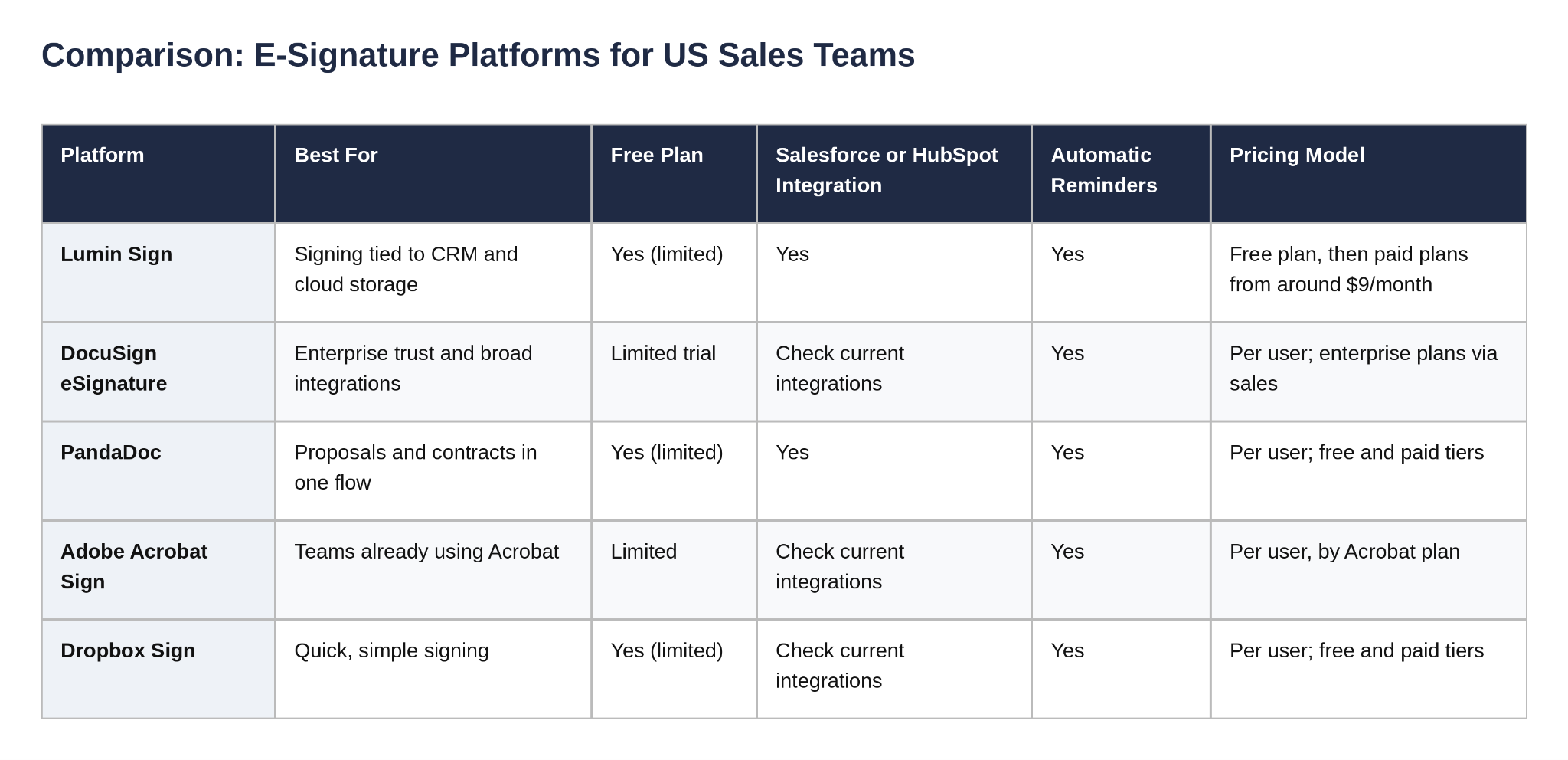
The sections below compare the leading US e-signature platforms for sales teams. Each tool is judged on how quickly it moves a contract from sent to signed, how well it fits into the CRM, and how much it costs per user.
What Sales Teams Need From an E-Signature Platform
Speed is the first requirement, but it is not the only one. A strong platform for sales teams should:
Send in minutes. A rep should be able to upload a contract, add signature fields, and send it without help from legal or operations.
Track signing status. The rep should see who has opened, signed, or stalled.
Send reminders automatically. Follow-ups should go out on a schedule, not on memory.
Connect to the CRM. A signed contract should update the deal record without copy-and-paste.
Produce legally recognized signatures. In the United States, the ESIGN Act and the Uniform Electronic Transactions Act (UETA) govern most electronic signatures.
Fit the budget. Per-user pricing adds up quickly across a sales team.
The Leading US E-Signature Platforms for Sales Teams
1. Lumin Sign – Fast Sending, Clear Tracking, Practical Pricing
Lumin Sign is the eSignature workflow inside Lumin, a cloud document platform. A rep uploads a PDF, invites signers, sets a due date, and places text, date, and signature fields for each signer. Signers can sign from any device without creating an account. The sender can see the status of each signer and receives notifications as each one signs.
For sales teams, the strongest features are the automatic reminders and the ability to request several signatures at once from a single dashboard. Signed documents include an audit trail and a certificate of completion.
Lumin integrates with Salesforce and HubSpot, so teams that manage deals in either CRM can keep signing inside their existing workflow. Teams that run on Google Workspace can also open and edit PDFs from Google Drive. Lumin's eSignatures are recognized under the ESIGN Act and UETA. For higher-assurance cases, an optional Verified Digital Signing feature checks the signer's identity at the point of signing.
Best for: Sales teams that send a steady volume of contracts and want signing tied to their CRM and cloud storage.
Free plan: A free plan is available for sending a limited number of documents each month. Check the pricing page for current limits.
Pricing: Paid plans start from around $9 per month. See the Lumin pricing page for current tiers.
Limitation: Advanced contract management, such as multi-round redlining and obligation tracking after signature, is outside the scope of Lumin Sign. Teams with those needs may also look at a contract lifecycle management (CLM) platform.
2. DocuSign eSignature – The Standard for Enterprise Trust
DocuSign is the most widely recognized name in electronic signatures. Its scale and brand recognition make it a common choice for enterprise sales organizations, and counterparties generally recognize its signing experience. Its integration ecosystem is among the largest in the category.
For a fast-moving sales team, the trade-off is complexity and cost. Plans are priced per user, and larger configurations often require contacting sales. Smaller teams may find the feature set heavier than they need.
Best for: Enterprise sales organizations where counterparty recognition and a broad integration catalog matter more than simplicity or price.
Limitation: Higher cost and a more involved setup than lighter tools.
3. PandaDoc – Proposals and Contracts in One Flow
PandaDoc combines document creation, proposal workflows, and e-signature in one platform. Sales reps can build a proposal with pricing tables, send it for review, and collect the signature without switching tools. Reviewers on G2 rate PandaDoc highly for proposal and contract workflows.
PandaDoc is a strong fit when the proposal and the contract are the same document. Teams that only need to collect signatures on existing PDFs may find it broader than necessary.
Best for: Sales teams that create proposals and contracts from templates and want one workflow from draft to signature.
Limitation: The broader feature set can mean more to learn than a signing-only tool.
4. Adobe Acrobat Sign – Strong for Teams Already Using Acrobat
Adobe Acrobat Sign is well-suited to teams that already work in Acrobat for PDF editing. It offers reliable signing, templates, and tracking, and it fits naturally into Microsoft-based environments.
Pricing is per user and depends on the Acrobat plan. Teams that do not already use Acrobat may find the cost harder to justify for signing alone.
Best for: PDF-heavy teams that already pay for Acrobat and want signing in the same ecosystem.
Limitation: Less attractive as a standalone signing tool for teams that do not use other Acrobat features.
5. Dropbox Sign – Simple, Quick Signing
Dropbox Sign is built for fast, simple signing. Its interface is uncomplicated, which suits sales reps who send occasional agreements and do not want to configure a workflow. It also works with Dropbox storage.
Its strength is simplicity. Teams that need deep CRM automation or complex multi-stage routing may need additional tools.
Best for: Small sales teams that want to send signature requests quickly with minimal setup.
Limitation: Fewer built-in sales-specific features than proposal-led platforms.
Pricing and plan details change often. Confirm current figures on each vendor's pricing page before choosing.
How to Choose for a Sales Team
If reps send a steady volume of contracts and manage deals in Salesforce or HubSpot, shortlist Lumin Sign and DocuSign. Both integrate with the major CRMs. Lumin is the lighter option, with a free plan that suits small trials.
If reps build proposals and contracts from scratch each time, PandaDoc puts the proposal and the signature in one workflow.
If the broadest enterprise integration catalog and counterparty recognition are needed, DocuSign remains the most established choice, with a higher cost.
If the team already pays for Acrobat, Adobe Acrobat Sign keeps signing in the same environment.
If contracts are sent only occasionally and the simplest setup is wanted, Dropbox Sign is a practical starting point.
FAQ
Which e-signature platform is fastest for sales teams?
Speed depends on the workflow. Lumin Sign and Dropbox Sign are quick for sending signature requests on existing PDFs. PandaDoc is faster when the proposal and the contract are created in the same tool. The fastest option for a team is the one that matches how reps create documents today.
Do e-signatures work for US sales contracts?
In most cases, yes. The ESIGN Act and the Uniform Electronic Transactions Act (UETA) recognize electronic signatures for most commercial contracts in the United States. Some contract types, such as certain real estate or family law documents, may have additional requirements. Consult a qualified attorney for agreements with specific legal requirements.
Can a sales rep track who has signed a contract?
Yes. Lumin Sign shows the status of each signer and sends notifications as each person signs. Most platforms in this comparison offer similar tracking.
Can a signed contract update the CRM automatically?
Integration depth varies. Lumin Sign integrates with Salesforce and HubSpot. Confirm the specific integration features the CRM setup requires for the other platforms before committing.
Do buyers need an account to sign?
With Lumin Sign, signers can sign from an email link without creating an account. Check each platform's signer experience during a trial to confirm it fits buyers.
Is a free e-signature plan enough for a sales team?
A free plan is useful for testing a workflow or for reps who send only a few contracts a month. Teams that send contracts daily will usually need a paid plan. Review each vendor's current free plan limits before deciding.
Conclusion
For US sales teams, the right e-signature platform is the one that gets contracts signed quickly and fits the way reps already work. Lumin Sign offers fast sending, clear signing status, automatic reminders, and CRM integration with Salesforce and HubSpot. DocuSign offers enterprise trust and a broad integration catalog. PandaDoc combines proposals and signatures in one flow. Adobe Acrobat Sign suits teams already in Acrobat, and Dropbox Sign suits teams that want simplicity.
Start with the current contract process. Measure how long a signed contract takes today, then trial two or three platforms with real deals. The platform that shortens that cycle is the right one for the team.
ABOUT LUMIN PDF
Lumin PDF is a document workflow platform focused on PDF editing, collaboration and electronic signatures. Its eSignature workflow, Lumin Sign, allows teams to send documents for signature, track the status of each signer and send automatic reminders, with signing that works across desktop, tablet and mobile devices.
Media Relation
Lumin PDF Corporation
support@luminpdf.com
Legal Disclaimer:
EIN Presswire provides this news content "as is" without warranty of any kind. We do not accept any responsibility or liability for the accuracy, content, images, videos, licenses, completeness, legality, or reliability of the information contained in this article. If you have any complaints or copyright issues related to this article, kindly contact the author above.
